Protecting Your Privacy in Word: Using the Document Inspector Estimated Read time: 1 minute When you share a Word document, you may be giving away more than just the visible text. Hidden information—such as the author’s name, tracked changes, embedded comments, or document properties—can travel with the file. This metadata…
Cosurica on Twitter

⚠️ Security alert: scam adverts are being reported on YouTube, including fake schemes and AI-generated promotions that lead to suspicious sites.
With more people watching over the holidays, now’s a good time to stay cautious.
🔗 https://zurl.co/CMqiq

Wishing you a very Merry Christmas from all of us @Cosurica !
If you need us over the holidays you can find our opening hours here https://zurl.co/zucAx

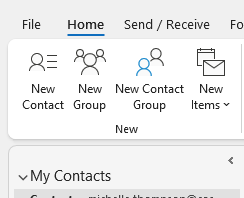
💡 Outlook tip: Use Contact Groups to email multiple people with one address.
Type the group name in the To: field and Outlook handles the rest — no missed recipients.
Here’s how to set it up:
🔗 https://zurl.co/Jo6o4

Use Outlook’s Immersive Reader to turn any email into a dyslexia-friendly view — or read it aloud while you multitask.
Speed-read, translate, or just listen on the go 👇
https://zurl.co/HI9Z3
Give it a try in your next long email thread! #Microsoft365 #OutlookTips #TechTips

